Transfer Function
In this example we demonstrate how to use transfer functions in PathSim using the Pole-Residue-Constant (PRC) form. This representation is particularly convenient for transfer functions with complex poles.
You can also find this example as a single file in the GitHub repository.
PathSim provides multiple transfer function representations:
TransferFunctionPRC: Pole-Residue-Constant form (poles and residues)TransferFunctionZPG: Zero-Pole-Gain form
In this example, we use the PRC form to define a transfer function with complex conjugate poles.
First let’s import the Simulation and Connection classes along with the required blocks:
[1]:
import matplotlib.pyplot as plt
import numpy as np

# Apply PathSim docs matplotlib style
plt.style.use('../pathsim_docs.mplstyle')

from pathsim import Simulation, Connection
from pathsim.blocks import Source, Scope, TransferFunctionPRC
from pathsim.solvers import RKCK54
Transfer Function Definition
The pole-residue-constant form represents a transfer function as:
where:
\(\mathbf{C}\) is the constant term (direct feedthrough)
\(\mathbf{R}_i\) are the residues
\(p_i\) are the poles
Complex conjugate poles must come with corresponding complex conjugate residues to ensure a real-valued impulse response.
[2]:
# Step delay for the input
tau = 5.0

# Simulation timestep
dt = 0.05

# Transfer function parameters
const = 0.0
poles = [-0.3, -0.05+0.4j, -0.05-0.4j, -0.1+2j, -0.1-2j]
residues = [-0.2, -0.2j, 0.2j, 0.3, 0.3]
This transfer function has:
One real pole at \(s = -0.3\)
Two pairs of complex conjugate poles at \(s = -0.05 \pm 0.4j\) and \(s = -0.1 \pm 2j\)
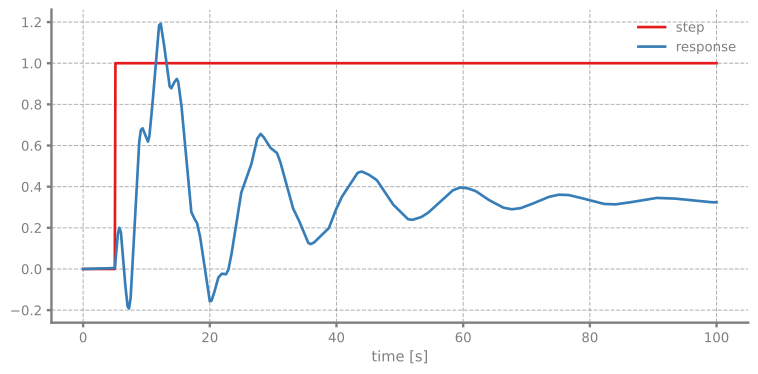
The complex poles will produce oscillatory behavior in the step response.
Now let’s create the blocks. We use a Source block to generate a step input and a TransferFunctionPRC block for our system:
[3]:
# Blocks and connections
Sr = Source(lambda t: int(t >= tau))
TF = TransferFunctionPRC(Poles=poles, Residues=residues, Const=const)
Sc = Scope(labels=["step", "response"])

blocks = [Sr, TF, Sc]

connections = [
    Connection(Sr, TF, Sc),
    Connection(TF, Sc[1])
]
We initialize the simulation with the RKCK54 solver (Runge-Kutta-Cash-Karp 5(4) method) for accurate integration:
[4]:
# Initialize simulation
Sim = Simulation(blocks, connections, dt=dt, log=True, Solver=RKCK54)
2025-10-23 15:26:15,311 - INFO - LOGGING (log: True)
2025-10-23 15:26:15,311 - INFO - BLOCK (type: Source, dynamic: False, events: 0)
2025-10-23 15:26:15,312 - INFO - BLOCK (type: TransferFunctionPRC, dynamic: True, events: 0)
2025-10-23 15:26:15,313 - INFO - BLOCK (type: Scope, dynamic: False, events: 0)
2025-10-23 15:26:15,313 - INFO - GRAPH (nodes: 3, edges: 3, alg. depth: 1, loop depth: 0, runtime: 0.087ms)
Now let’s run the simulation and plot the step response:
[5]:
# Run simulation
Sim.run(100)

# Plot the results from the scope directly
Sc.plot()
plt.show()
2025-10-23 15:26:15,317 - INFO - STARTING -> TRANSIENT (Duration: 100.00s)
2025-10-23 15:26:15,318 - INFO - TRANSIENT:   0% | elapsed: 00:00:00 (eta: --:--:--) | 0 steps (N/A steps/s)
2025-10-23 15:26:15,354 - INFO - TRANSIENT:  20% | elapsed: 00:00:00 (eta: --:--:--) | 197 steps (5486.8 steps/s)
2025-10-23 15:26:15,378 - INFO - TRANSIENT:  40% | elapsed: 00:00:00 (eta: --:--:--) | 319 steps (5027.5 steps/s)
2025-10-23 15:26:15,394 - INFO - TRANSIENT:  60% | elapsed: 00:00:00 (eta: --:--:--) | 397 steps (5043.8 steps/s)
2025-10-23 15:26:15,404 - INFO - TRANSIENT:  81% | elapsed: 00:00:00 (eta: --:--:--) | 452 steps (5238.4 steps/s)
2025-10-23 15:26:15,412 - INFO - TRANSIENT: 100% | elapsed: 00:00:00 (eta: --:--:--) | 491 steps (4766.6 steps/s)
2025-10-23 15:26:15,413 - INFO - TRANSIENT: 100% | elapsed: 00:00:00 (eta: --:--:--) | 491 steps (5113.2 avg steps/s)
2025-10-23 15:26:15,414 - INFO - FINISHED -> TRANSIENT (total steps: 491, successful: 334, runtime: 96.02 ms)