Diode Circuit
You can also find this example as a single file in the GitHub repository.This example demonstrates a more complex application of algebraic loop solving: a diode circuit with nonlinear characteristics. This showcases PathSim’s ability to handle nonlinear implicit equations that arise in real electronic circuits.
Circuit Description
The circuit consists of:
A sinusoidal voltage source: \(V_s(t) = 5\sin(2\pi t)\) V
A resistor: \(R = 1000\) Ω
A diode with exponential I-V characteristic
Diode Model
The diode current follows the Shockley equation:
Where:
\(I_s = 10^{-12}\) A (saturation current)
\(V_T = 26\) mV (thermal voltage at room temperature)
\(V_D\) is the diode voltage
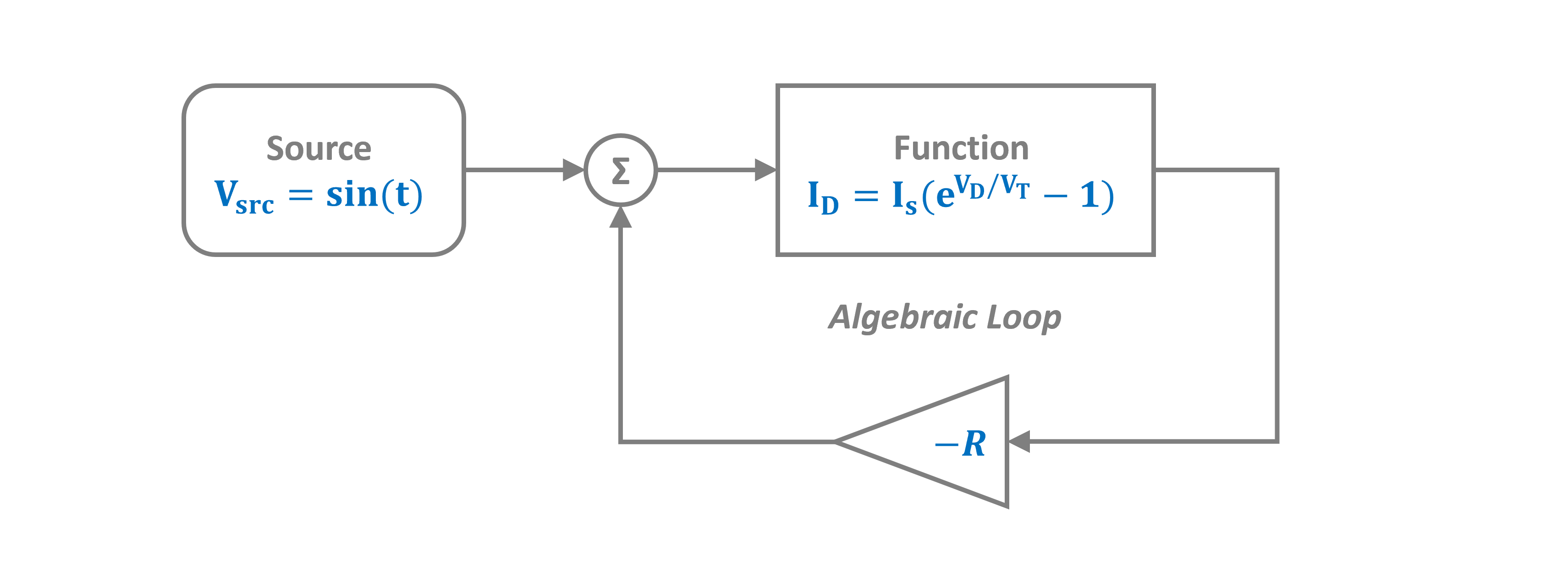
The Algebraic Loop
Applying Kirchhoff’s Voltage Law (KVL):
Substituting the diode equation creates a nonlinear algebraic loop:
PathSim solves this nonlinear equation automatically at each timestep using accelerated fixed-point iteration.
This example demonstrates a nonlinear algebraic loop. The Function block implements the diode characteristic, and PathSim solves the implicit circuit equations automatically.
[1]:
import numpy as np
import matplotlib.pyplot as plt

# Apply PathSim docs matplotlib style
plt.style.use('../pathsim_docs.mplstyle')

from pathsim import Simulation, Connection
from pathsim.blocks import Source, Amplifier, Function, Adder, Scope
from pathsim.solvers import RKBS32
Circuit Parameters
[2]:
# Circuit parameters
R = 1000.0          # Resistor (Ohms)
I_s = 1e-12         # Diode saturation current (A)
V_T = 0.026         # Thermal voltage at room temperature (V)

# Define diode current function: i = I_s * (exp(v_diode/(V_T)) - 1)
def diode_current(v_diode):
    """Diode current as function of diode voltage"""
    # Clip to prevent numerical overflow
    clipped = np.clip(v_diode/V_T, None, 23)
    return I_s * (np.exp(clipped) - 1)

# Define voltage source function
def voltage_source(t):
    """Sinusoidal voltage source"""
    return 5.0 * np.sin(2 * np.pi * t)
[3]:
# Blocks that define the system
Src = Source(voltage_source)                    # Voltage source
DiodeFn = Function(diode_current)               # Diode i-v characteristic
ResAmp = Amplifier(-R)                          # -R (negative resistance)
Add = Adder()                                   # Adder for KVL
Sc1 = Scope(labels=["v_source", "v_diode"])
Sc2 = Scope(labels=["i_diode"])

blocks = [Src, DiodeFn, ResAmp, Add, Sc1, Sc2]
Connections
The connections implement Kirchhoff’s laws:
The adder computes: \(V_{diode} = V_{source} + V_{resistor}\)
The resistor voltage is: \(V_{resistor} = -R \cdot i_{diode}\)
The diode current depends on: \(V_{diode}\) (creating the loop)
[4]:
connections = [
    Connection(Src, Add[0], Sc1[0]),            # Source to adder and scope
    Connection(Add, DiodeFn, Sc1[1]),           # Diode voltage to function and scope
    Connection(DiodeFn, ResAmp, Sc2),           # Diode current to resistor and scope
    Connection(ResAmp, Add[1]),                 # Voltage drop back to adder (loop!)
]
Simulation
We use a tight convergence tolerance (tolerance_fpi=1e-12) to ensure accurate solution of the nonlinear algebraic equation.
[5]:
# Simulation instance
Sim = Simulation(
    blocks,
    connections,
    dt=0.001,
    tolerance_fpi=1e-12
)

# Run the simulation for 2 seconds
Sim.run(duration=2.0)
2025-10-23 15:24:27,001 - INFO - LOGGING (log: True)
2025-10-23 15:24:27,002 - INFO - BLOCK (type: Source, dynamic: False, events: 0)
2025-10-23 15:24:27,002 - INFO - BLOCK (type: Function, dynamic: False, events: 0)
2025-10-23 15:24:27,003 - INFO - BLOCK (type: Amplifier, dynamic: False, events: 0)
2025-10-23 15:24:27,003 - INFO - BLOCK (type: Adder, dynamic: False, events: 0)
2025-10-23 15:24:27,004 - INFO - BLOCK (type: Scope, dynamic: False, events: 0)
2025-10-23 15:24:27,005 - INFO - BLOCK (type: Scope, dynamic: False, events: 0)
2025-10-23 15:24:27,006 - INFO - GRAPH (nodes: 6, edges: 7, alg. depth: 1, loop depth: 3, runtime: 0.112ms)
2025-10-23 15:24:27,007 - INFO - STARTING -> TRANSIENT (Duration: 2.00s)
2025-10-23 15:24:27,007 - INFO - TRANSIENT:   0% | elapsed: 00:00:00 (eta: --:--:--) | 0 steps (N/A steps/s)
2025-10-23 15:24:27,322 - INFO - TRANSIENT:  20% | elapsed: 00:00:00 (eta: 00:00:01) | 400 steps (1270.5 steps/s)
2025-10-23 15:24:27,392 - INFO - TRANSIENT:  40% | elapsed: 00:00:00 (eta: 00:00:00) | 800 steps (5731.9 steps/s)
2025-10-23 15:24:27,562 - INFO - TRANSIENT:  60% | elapsed: 00:00:00 (eta: 00:00:00) | 1201 steps (2356.3 steps/s)
2025-10-23 15:24:27,775 - INFO - TRANSIENT:  80% | elapsed: 00:00:00 (eta: 00:00:00) | 1601 steps (1879.6 steps/s)
2025-10-23 15:24:27,792 - INFO - TRANSIENT: 100% | elapsed: 00:00:00 (eta: 00:00:00) | 2001 steps (23364.3 steps/s)
2025-10-23 15:24:27,792 - INFO - TRANSIENT: 100% | elapsed: 00:00:00 (eta: 00:00:00) | 2001 steps (2547.7 avg steps/s)
2025-10-23 15:24:27,793 - INFO - FINISHED -> TRANSIENT (total steps: 2001, successful: 2001, runtime: 785.42 ms)
[5]:
{'total_steps': 2001,
 'successful_steps': 2001,
 'runtime_ms': 785.4152239997347}
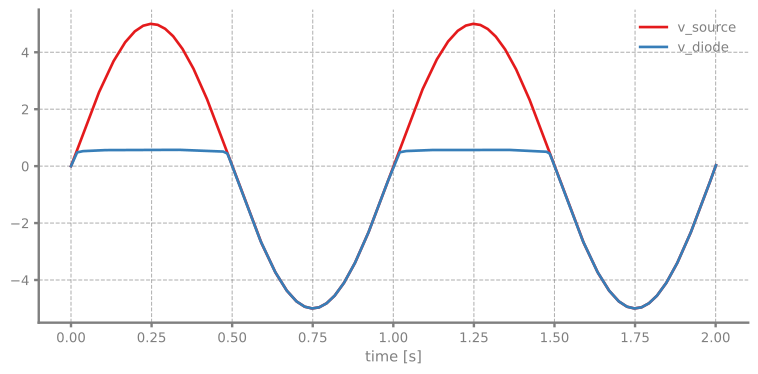
Results: Voltage Waveforms
The plots show:
v_source (blue): Input sinusoidal voltage
v_diode (orange): Voltage across the diode
Notice how the diode voltage is:
Clamped near ~0.7V during forward bias (positive half-cycle)
Follows the source during reverse bias (negative half-cycle, diode is off)
This is the classic diode rectifier behavior!
[6]:
Sim.plot()
plt.show()
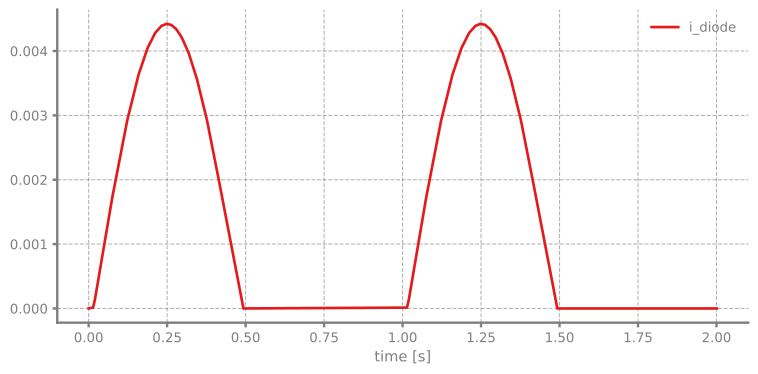
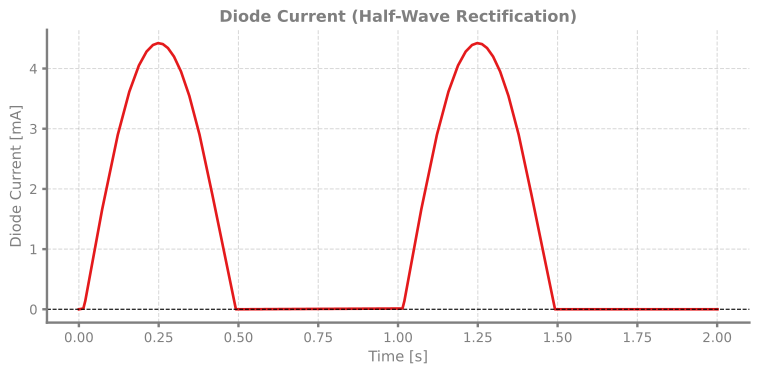
Diode Current
Let’s examine the diode current to see the rectification more clearly.
[7]:
# Get results
time, [i_diode] = Sc2.read()

fig, ax = plt.subplots(figsize=(8, 4))
ax.plot(time, i_diode * 1000, linewidth=2)  # Convert to mA
ax.set_xlabel('Time [s]')
ax.set_ylabel('Diode Current [mA]')
ax.set_title('Diode Current (Half-Wave Rectification)')
ax.grid(True, alpha=0.3)
ax.axhline(y=0, color='k', linestyle='--', linewidth=0.8)
plt.tight_layout()
plt.show()
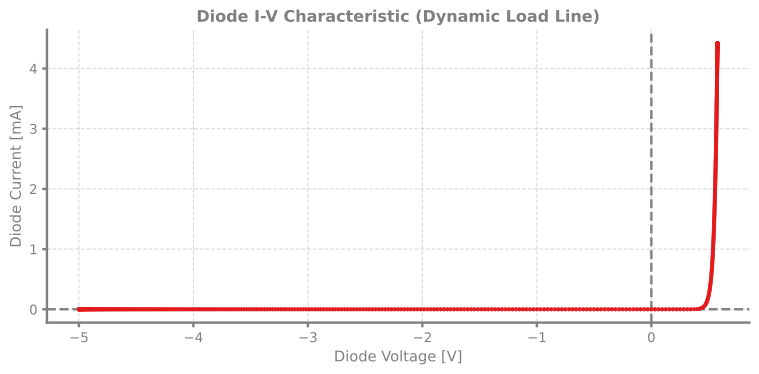
Diode I-V Characteristic
We can also visualize the diode’s I-V characteristic by plotting current vs. voltage.
[8]:
# Get diode voltage
_, [v_source, v_diode] = Sc1.read()

# Plot I-V characteristic
fig, ax = plt.subplots(figsize=(8, 4))

ax.axhline(y=0, color='grey', linestyle='--', linewidth=1.8)
ax.axvline(x=0, color='grey', linestyle='--', linewidth=1.8)

ax.plot(v_diode, i_diode * 1000, '.', markersize=3, alpha=0.5)

ax.set_xlabel('Diode Voltage [V]')
ax.set_ylabel('Diode Current [mA]')
ax.set_title('Diode I-V Characteristic (Dynamic Load Line)')
ax.grid(True, alpha=0.3)
plt.tight_layout()
plt.show()