Poincaré Maps
Demonstration of computing Poincaré sections for chaotic dynamical systems using event handling.
What are Poincaré Maps?
For a 3D system like the Lorenz attractor, the full trajectory traces out a complex path in three-dimensional space. A Poincaré section is created by:
Defining a 2D surface (or plane) in the 3D phase space
Recording the system state each time the trajectory crosses this surface
Plotting these intersection points to reveal the underlying structure
This reduces the dimensionality from 3D to 2D, making it easier to:
Identify periodic orbits (which appear as fixed points or closed loops)
Detect chaotic behavior (which appears as scattered but structured point clouds)
Analyze the stability and structure of attractors
The Lorenz System
We’ll use the famous Lorenz attractor as our test case. The system consists of three coupled nonlinear ODEs:
With the classic parameters \(\sigma = 10\), \(\rho = 28\), and \(\beta = 8/3\) that produce chaotic behavior.
[1]:
import numpy as np
import matplotlib.pyplot as plt

# Apply PathSim docs matplotlib style for consistent, theme-friendly figures
plt.style.use('../pathsim_docs.mplstyle')

from pathsim import Simulation, Connection
from pathsim.blocks import Scope, ODE
from pathsim.solvers import RKCK54
from pathsim.events import ZeroCrossing
Import and Setup
We’ll use the compact ODE block formulation to define the Lorenz system, along with PathSim’s event handling capabilities to detect surface crossings.
We use the :class:`.ODE` block to define the Lorenz system and :class:`.ZeroCrossing` events to detect when the trajectory crosses our defined planes.[2]:
# parameters
sigma, rho, beta = 10, 28, 8/3

# Initial conditions
xyz_0 = np.array([1.0, 1.0, 1.0])

def f_lorenz(_x, _u, t):
    x, y, z = _x
    return np.array([sigma*(y-x), x*(rho-z)-y, x*y-beta*z])

lrz = ODE(func=f_lorenz, initial_value=xyz_0)
sco = Scope(labels=["x", "y", "z"])

blocks = [lrz, sco]

connections = [
    Connection(lrz[:3], sco[:3])
    ]
System Definition
We define the Lorenz system using an ODE block with the standard parameters and initial conditions. The Scope block will record the full trajectory for visualization.
The ODE block provides a compact way to define systems of differential equations, while the Scope block records signals for later analysis. The ZeroCrossing event continuously monitors the event function and triggers when it crosses zero. The action function is then called to record the intersection point.
Defining Poincaré Sections
Now comes the key part: defining the Poincaré sections. We’ll create three different sections to view the attractor from different perspectives.
Section 1: y = 0 plane (captures x-z coordinates)
The first section is defined by the plane y = 0. Each time the trajectory crosses this plane, we record the x and z coordinates. This is implemented using a ZeroCrossing event:
[3]:
pcm_xz = {"x":[], "z":[]}

def fnc_xz_evt(t):
    *_, [x, y, z] = lrz()
    return y

def fnc_xz_act(t):
    *_, [x, y, z] = lrz()
    pcm_xz["x"].append(x)
    pcm_xz["z"].append(z)

E_xz = ZeroCrossing(
    func_evt=fnc_xz_evt,
    func_act=fnc_xz_act
    )
Section 2: x = 0 plane (captures y-z coordinates)
Similarly, we create a section at x = 0 to record y and z coordinates:
[4]:
pcm_yz = {"y":[], "z":[]}

def fnc_yz_evt(t):
    *_, [x, y, z] = lrz()
    return x

def fnc_yz_act(t):
    *_, [x, y, z] = lrz()
    pcm_yz["y"].append(y)
    pcm_yz["z"].append(z)

E_yz = ZeroCrossing(
    func_evt=fnc_yz_evt,
    func_act=fnc_yz_act
    )
Section 3: z = 30 plane (captures x-y coordinates)
Finally, we create a horizontal section at z = 30. This plane cuts through the upper part of the attractor’s “wings”:
[5]:
pcm_xy = {"x":[], "y":[]}

def fnc_xy_evt(t):
    *_, [x, y, z] = lrz()
    return z - 30

def fnc_xy_act(t):
    *_, [x, y, z] = lrz()
    pcm_xy["x"].append(x)
    pcm_xy["y"].append(y)

E_xy = ZeroCrossing(
    func_evt=fnc_xy_evt,
    func_act=fnc_xy_act
    )
Collecting Events
We collect all three events into a list to pass to the simulation. Each event will independently monitor for its respective zero crossing and record the intersection points.
[6]:
events = [E_xz, E_yz, E_xy]
Simulation Setup
We create the simulation with the RKCK54 adaptive solver (similar to MATLAB’s ode45). The solver’s adaptive time-stepping works together with the event handling system to accurately locate each zero crossing where the trajectory intersects our Poincaré sections.
The RKCK54 solver is a 5th-order Runge-Kutta method with adaptive time-stepping that efficiently handles the nonlinear dynamics while accurately locating zero crossing events.
[7]:
Sim = Simulation(
    blocks,
    connections,
    events,
    Solver=RKCK54,
    tolerance_lte_rel=1e-6,
    tolerance_lte_abs=1e-8,
    )
08:49:36 - INFO - LOGGING (log: True)
08:49:36 - INFO - BLOCKS (total: 2, dynamic: 1, static: 1, eventful: 0)
08:49:36 - INFO - GRAPH (nodes: 2, edges: 1, alg. depth: 1, loop depth: 0, runtime: 0.026ms)
Running the Simulation
We run the simulation for 100 seconds to collect enough intersection points. The Lorenz system’s chaotic behavior ensures the trajectory visits many different regions of the attractor, building up a clear picture of the Poincaré sections.
[8]:
#run the simulation
Sim.run(100);
08:49:36 - INFO - STARTING -> TRANSIENT (Duration: 100.00s)
08:49:36 - INFO - --------------------   1% | 0.0s<0.7s | 4963.9 it/s
08:49:37 - INFO - ####----------------  20% | 0.3s<0.5s | 4832.7 it/s
08:49:37 - INFO - ########------------  40% | 0.5s<0.4s | 4863.6 it/s
08:49:37 - INFO - ############--------  60% | 0.8s<1.4s | 4929.6 it/s
08:49:37 - INFO - ################----  80% | 1.1s<0.1s | 4978.5 it/s
08:49:38 - INFO - #################### 100% | 1.4s<--:-- | 4929.7 it/s
08:49:38 - INFO - FINISHED -> TRANSIENT (total steps: 6610, successful: 4889, runtime: 1404.11 ms)
Results: Poincaré Maps Visualization
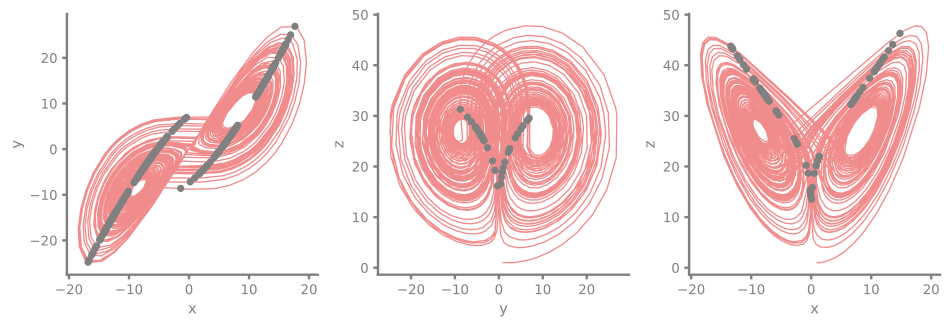
Now we can visualize the results. For each plot, we show:
The full trajectory (semi-transparent line) projected onto the 2D plane
The Poincaré section points (gray dots) showing where the trajectory intersects the respective plane
Interpreting the Poincaré Maps
The Poincaré maps reveal the attractor’s fractal structure:
x-y section (z = 30): Shows two distinct point clouds corresponding to the two lobes of the butterfly
y-z sections (x = 0): Reveals the characteristic curved structure as the trajectory switches between lobes
x-z sections (y = 0): Displays a similar curved pattern, showing the vertical extent of the attractor
The scattered yet structured appearance of these points is a signature of deterministic chaos. The points are not random—they trace out a complex geometric structure called a strange attractor. If we were to simulate longer, these point clouds would become denser but would never fill the entire 2D space; instead, they reveal the attractor’s intricate, self-similar geometry.
[9]:
time, [x, y, z] = sco.read()

fig, ax = plt.subplots(ncols=3, figsize=(10, 3.5), tight_layout=True, dpi=200)

# x-y-slice
ax[0].plot(x, y, lw=1, alpha=0.5)
ax[0].plot(pcm_xy["x"], pcm_xy["y"], ".", c="gray")
ax[0].set_xlabel("x")
ax[0].set_ylabel("y")

# y-z-sclice
ax[1].plot(y, z, lw=1, alpha=0.5)
ax[1].plot(pcm_yz["y"], pcm_yz["z"], ".", c="gray")
ax[1].set_xlabel("y")
ax[1].set_ylabel("z")

# x-z-sclice
ax[2].plot(x, z, lw=1, alpha=0.5)
ax[2].plot(pcm_xz["x"], pcm_xz["z"], ".", c="gray")
ax[2].set_xlabel("x")
ax[2].set_ylabel("z");