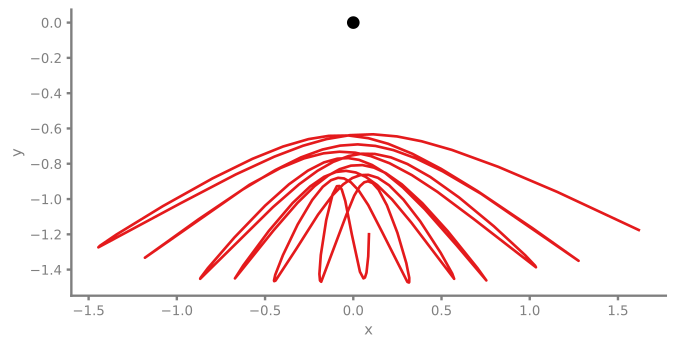
Elastic Pendulum
Simulation of an elastic pendulum combining spring and pendulum dynamics.
You can also find this example as a standalone Python file in the GitHub repository.
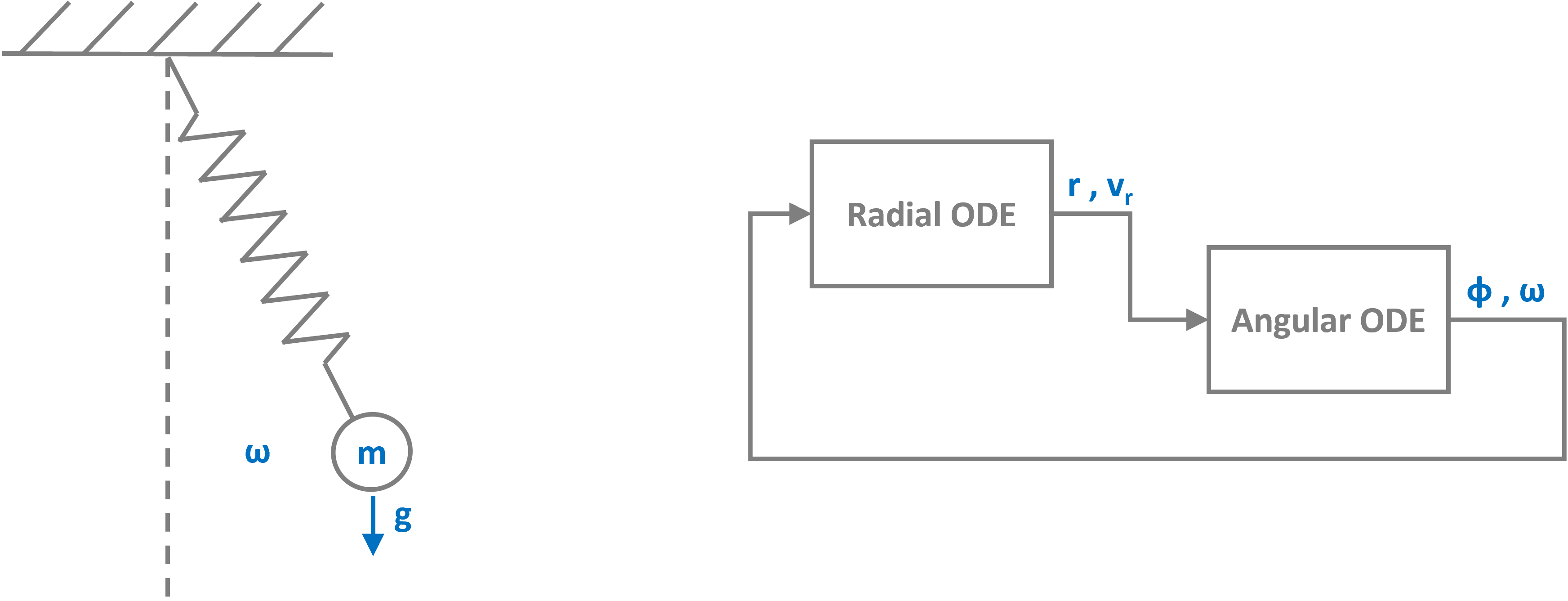
We implement this system im pathsim through two separate ODE blocks, one for the radial and one for the angular dynamics. The connections between the blocks represent the coupling through the forces.
[1]:
import numpy as np
import matplotlib.pyplot as plt

# Apply PathSim docs matplotlib style
plt.style.use('../pathsim_docs.mplstyle')

from pathsim import Simulation, Connection
from pathsim.blocks import ODE, Function, Scope
from pathsim.solvers import RKBS32
[2]:
# Initial conditions
r0, vr0 = 2, 0.0
phi0, omega0 = 0.3*np.pi, 0.0

# Physical parameters
g = 9.81          # gravity [m/s^2]
l0 = 1.0          # natural spring length [m]
k = 50.0          # spring constant [N/m]
m = 1.0           # mass [kg]
c_r = 0.3         # radial damping [kg/s]
c_phi = 0.1       # angular damping [N m s]
Next, the two ODE blocks are defined through their right hand side function. For the radial component this is the following set of odes with the centrifugal force coupling and the acceleration through gravity:
[3]:
# Define the radial ODE (spring-mass-damper with coupling terms)
def rad_ode(x, u, t):
    r, vr = x
    omega, phi = u

    # radial acceleration terms
    centrifugal = r * omega**2
    spring = -(k/m) * (r - l0)
    gravity_rad = g * np.cos(phi)
    damping = -(c_r/m) * vr

    accel_r = centrifugal + spring + gravity_rad + damping

    return np.array([vr, accel_r])

rad = ODE(rad_ode, np.array([r0, vr0]))
For the angular component we have the following odes:
[4]:
# Define the angular ODE (pendulum with coupling terms)
def ang_ode(x, u, t):
    phi, omega = x
    r, vr = u

    # angular acceleration terms
    gravity_torque = -(g / r) * np.sin(phi)
    coriolis = -(2 / r) * vr * omega
    damping = -(c_phi / (m * r**2)) * omega

    accel_phi = gravity_torque + coriolis + damping

    return np.array([omega, accel_phi])

ang = ODE(ang_ode, np.array([phi0, omega0]))
For straight forward plotting and evaluation it makes sense to convert from polar to cartesian coordinates. For this, we use a Function block. It can be defined through a decorator which makes it super compact:
[5]:
# Cartesian conversion
@Function
def crt(r, phi):
    return r*np.sin(phi), -r*np.cos(phi)
[6]:
# Scopes for visualization
sc1 = Scope(labels=["r [m]", "vr [m/s]", "phi [rad]", "omega [rad/s]"])
sc2 = Scope(labels=["x [m]", "y [m]"], sampling_period=0.005)
Next, define the connections (Connection) between the two blocks…
[7]:
blocks = [rad, ang, crt, sc1, sc2]
[8]:
connections = [
    Connection(ang[1], rad[0]),           # omega -> rad input 0
    Connection(ang[0], rad[1], crt[1]),   # phi -> rad input 1
    Connection(rad[0], ang[0], crt[0]),   # r -> ang input 0
    Connection(rad[1], ang[1]),           # vr -> ang input 1
    Connection(rad[:2], sc1[:2]),         # r, vr -> scope
    Connection(ang[:2], sc1[2:4]),        # phi, omega -> scope
    Connection(crt[:2], sc2[:2])
    ]
… initialize the Simulation with the blocks and connections. The dynamics of this system can be very chaotic, so it makes sense to use an adaptive timestep ode solver such as RKBS32:
[9]:
# Simulation instance
sim = Simulation(
    blocks,
    connections,
    Solver=RKBS32
    )
08:48:13 - INFO - LOGGING (log: True)
08:48:13 - INFO - BLOCKS (total: 5, dynamic: 2, static: 3, eventful: 1)
08:48:13 - INFO - GRAPH (nodes: 5, edges: 9, alg. depth: 2, loop depth: 0, runtime: 0.079ms)
[10]:
# Run the simulation
sim.run(10)
08:48:13 - INFO - STARTING -> TRANSIENT (Duration: 10.00s)
08:48:13 - INFO - --------------------   1% | 0.0s<0.7s | 2833.0 it/s
08:48:13 - INFO - ####----------------  20% | 0.2s<0.5s | 2929.1 it/s
08:48:14 - INFO - ########------------  40% | 0.4s<0.9s | 1381.5 it/s
08:48:14 - INFO - ############--------  60% | 0.7s<0.6s | 1375.1 it/s
08:48:14 - INFO - ################----  80% | 0.8s<0.1s | 2932.1 it/s
08:48:14 - INFO - #################### 100% | 1.0s<--:-- | 2971.3 it/s
08:48:14 - INFO - FINISHED -> TRANSIENT (total steps: 2130, successful: 2083, runtime: 978.65 ms)
[10]:
{'total_steps': 2130,
 'successful_steps': 2083,
 'runtime_ms': 978.6531800000375}
One of pathsims convenient features is that each block is physicalized. This means the Scope block records the signals internally and the data can be read and plotted through its local methods directly:
[11]:
# Plot state variables
sc1.plot();
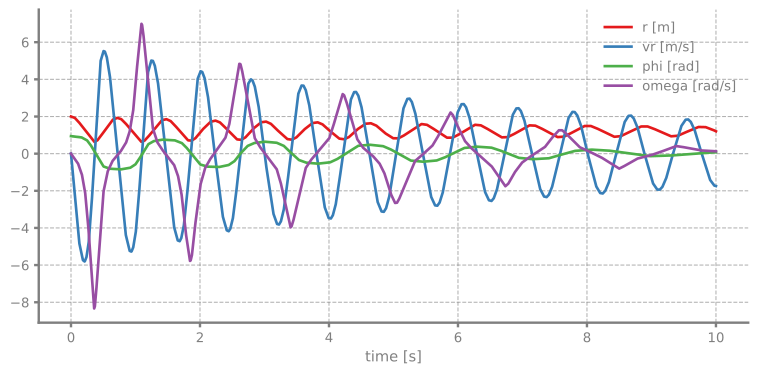
We can clearly see the mass jumping back and forth, driventhrough the contracting spring at each swing:
[12]:
# Plot the trajectory

t, (x, y) = sc2.read()

fig, ax = plt.subplots()
ax.plot(0, 0, "o", c="k")
ax.plot(x, y)
ax.set_xlabel("x")
ax.set_ylabel("y")
ax.set_aspect(1)