FMU Co-Simulation
Demonstration of integrating Functional Mock-up Units (FMU) as PathSim blocks.
What is an FMU?
The Functional Mock-up Interface (FMI) is an open standard for model exchange and co-simulation. An FMU is a ZIP archive containing:
Model equations (compiled binaries)
XML description of variables and metadata
Optional resources and documentation
PathSim supports FMI 2.0 and FMI 3.0 co-simulation FMUs through the FMPy library.
The Coupled Clutches Model
This example uses a coupled clutches system, which is a classic benchmark from the FMI standard examples. The system consists of:
Multiple rotating inertias
Clutches connecting the inertias
An input torque driving the system
The FMU has:
1 input: Torque applied to the first clutch
4 outputs: Angular velocities of the four rotating masses
This example demonstrates the CoSimulationFMU block, which wraps an FMU for integration with PathSim’s simulation environment.
Import and Setup
Note that FMPy must be installed to use FMU blocks:
pip install fmpy
First, let’s import the required classes:
[1]:
import numpy as np
import matplotlib.pyplot as plt

# Apply PathSim docs matplotlib style
plt.style.use('../pathsim_docs.mplstyle')

from pathsim import Simulation, Connection
from pathsim.blocks import Source, Scope, CoSimulationFMU
FMU Path
We need to provide the path to the FMU file. In this example, we use the coupled clutches FMU:
[2]:
import platform
from pathlib import Path

notebook_dir = Path().resolve()
system = platform.system()

# Select FMU based on platform
if system == "Windows":
    fmu_filename = "CoupledClutches_CS_win64.fmu"
elif system == "Linux":
    fmu_filename = "CoupledClutches_CS_linux64.fmu"

fmu_path = notebook_dir / "data" / fmu_filename

# Verify FMU exists
if not fmu_path.exists():
    raise FileNotFoundError(f"FMU file not found at {fmu_path}")
Create the FMU Block
The CoSimulationFMU block handles all the FMI protocol details:
- Instantiates the FMU
- Manages initialization and termination
- Synchronizes inputs and outputs
- Performs co-simulation steps at the specified dt
[3]:
# Create FMU block with 10ms communication step size
fmu = CoSimulationFMU(fmu_path, dt=0.01)

# Display FMU metadata (accessed via fmu_wrapper)
md = fmu.fmu_wrapper.model_description
print(f"Model Name: {md.modelName}")
print(f"FMI Version: {fmu.fmu_wrapper.fmi_version}")
print(f"Generation Tool: {md.generationTool}")
print(f"Description: {md.description}")
print(f"\nCommunication step size: {fmu.dt}s")
Model Name: CoupledClutches
FMI Version: 2.0
Generation Tool: MapleSim (1579660/1578573)
Description: CoupledClutches example from the FMI test suite

Communication step size: 0.01s
/tmp/ipykernel_5053/1186632808.py:2: DeprecationWarning: 'CoSimulationFMU' is deprecated and will be removed in version 1.0.0. Use 'pathsim_fmi.CoSimulationFMU' instead. This block has moved to the pathsim-fmi package: pip install pathsim-fmi
  fmu = CoSimulationFMU(fmu_path, dt=0.01)
System Setup
We create a sinusoidal torque input to drive the system and a scope to record all signals:
[4]:
# Input torque - sinusoidal excitation
src = Source(lambda t: 0.1 * np.sin(5*t))

# Scope to record all signals
sco = Scope(labels=["Input Torque", "ω₁", "ω₂", "ω₃", "ω₄"])

blocks = [fmu, src, sco]
Connections
The FMU block behaves like any other PathSim block. We connect: - The source to the FMU input (torque) - The FMU outputs (4 angular velocities) to the scope - The input signal is also recorded for reference
[5]:
connections = [
    Connection(src[0], fmu[0], sco[0]),  # Input torque to FMU and scope
    Connection(fmu[:4], sco[1:5])        # FMU outputs (4 velocities) to scope
]
Simulation
The simulation timestep is set smaller than the FMU communication step size. PathSim automatically handles the scheduling of FMU co-simulation steps:
[6]:
# Initialize simulation
# Use a smaller dt than FMU step size for smoother PathSim integration
sim = Simulation(
    blocks=blocks,
    connections=connections,
    dt=fmu.dt/5,  # PathSim timestep is 5x smaller than FMU step
    log=True
)

# Run simulation for 20 seconds
sim.run(20)
08:48:43 - INFO - LOGGING (log: True)
08:48:43 - INFO - BLOCKS (total: 3, dynamic: 0, static: 3, eventful: 1)
08:48:43 - INFO - GRAPH (nodes: 3, edges: 3, alg. depth: 1, loop depth: 0, runtime: 0.036ms)
08:48:43 - INFO - STARTING -> TRANSIENT (Duration: 20.00s)
08:48:43 - INFO - --------------------   1% | 0.0s<0.3s | 37606.0 it/s
08:48:43 - INFO - ####----------------  20% | 0.1s<0.2s | 34345.2 it/s
08:48:43 - INFO - ########------------  40% | 0.1s<0.2s | 35361.7 it/s
08:48:43 - INFO - ############--------  60% | 0.2s<0.2s | 21263.2 it/s
08:48:43 - INFO - ################----  80% | 0.3s<0.1s | 38198.7 it/s
08:48:43 - INFO - #################### 100% | 0.3s<--:-- | 36993.6 it/s
08:48:43 - INFO - FINISHED -> TRANSIENT (total steps: 10001, successful: 10001, runtime: 328.54 ms)
[6]:
{'total_steps': 10001,
 'successful_steps': 10001,
 'runtime_ms': 328.53821599974253}
Results
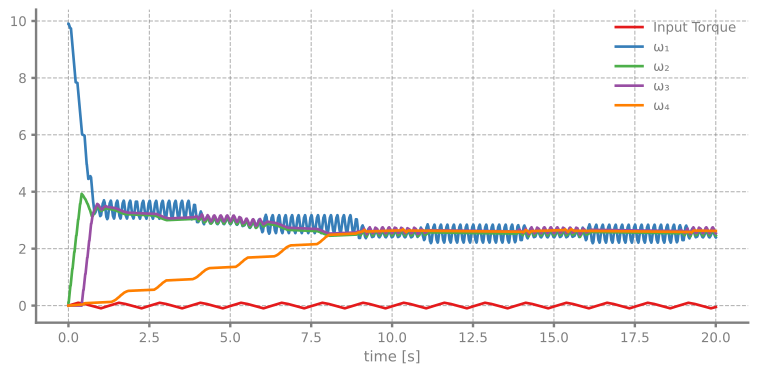
Let’s plot the input torque and the angular velocities of all four clutches:
[7]:
sco.plot()
plt.show()
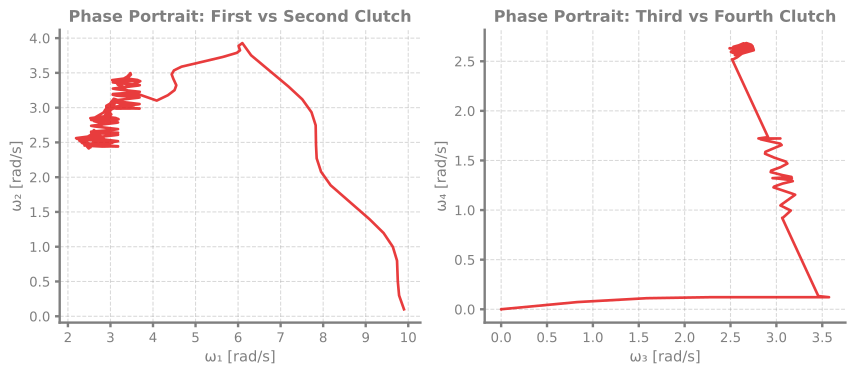
Analysis: Phase Space
We can examine the relationship between the angular velocities in phase space:
[8]:
# Get simulation data
time, [torque, w1, w2, w3, w4] = sco.read()

# Phase portrait
fig, axes = plt.subplots(1, 2, figsize=(9, 4), dpi=200)

# ω₁ vs ω₂
axes[0].plot(w1, w2, alpha=0.85)
axes[0].set_xlabel('ω₁ [rad/s]')
axes[0].set_ylabel('ω₂ [rad/s]')
axes[0].set_title('Phase Portrait: First vs Second Clutch')
axes[0].grid(True, alpha=0.3)

# ω₃ vs ω₄
axes[1].plot(w3, w4, alpha=0.85)
axes[1].set_xlabel('ω₃ [rad/s]')
axes[1].set_ylabel('ω₄ [rad/s]')
axes[1].set_title('Phase Portrait: Third vs Fourth Clutch')
axes[1].grid(True, alpha=0.3)

plt.tight_layout()
plt.show()
FMU Integration Details
Communication Step Size
The FMU performs internal integration steps with its own solver. The dt parameter specifies how often PathSim exchanges data with the FMU:
Smaller ``dt``: More frequent data exchange, higher accuracy, slower simulation
Larger ``dt``: Less frequent exchange, faster simulation, potentially lower accuracy
PathSim vs FMU Timestep
PathSim can use a different (typically smaller) timestep than the FMU communication interval. This allows:
Smooth integration with other PathSim blocks
Fine-grained logging and event detection
The FMU only performs co-simulation steps at its specified
dt
Event Handling
The FMU block uses PathSim’s event scheduling system to trigger co-simulation steps at regular intervals. You can see the scheduled events:
[9]:
# Number of FMU co-simulation steps performed
print(f"Total FMU steps: {len(fmu.events[0])}")
print(f"Expected steps: {int(20/fmu.dt) + 1}")
Total FMU steps: 2001
Expected steps: 2001
Key Features of CoSimulationFMU
Supports FMI 2.0 and FMI 3.0 standards
Automatic metadata extraction and port configuration
Configurable communication step size
Event-based synchronization with PathSim
Full reset and re-initialization support