Lorenz Attractor
You can also find this example as a single file in the GitHub repository.This example demonstrates the famous Lorenz attractor, a system of ordinary differential equations that exhibits chaotic behavior. It’s one of the most iconic examples in chaos theory and was discovered by Edward Lorenz in 1963 while studying atmospheric convection.
The Lorenz System
The system consists of three coupled nonlinear ODEs:
Where the parameters are:
\(\sigma = 10\) (Prandtl number)
\(\rho = 28\) (Rayleigh number)
\(\beta = 8/3\) (geometric factor)
Chaotic Behavior
For these parameters, the system exhibits sensitive dependence on initial conditions - tiny changes in starting values lead to completely different trajectories. Despite being deterministic, the system appears random and unpredictable over long timescales.
Building the System in PathSim
We’ll construct the Lorenz system using basic blocks (integrators, amplifiers, multipliers, adders) to show PathSim’s block-diagram approach to ODEs.
The Lorenz system is built using basic blocks like Integrator, Multiplier, and Adder to demonstrate PathSim's block-diagram approach.
[1]:
import numpy as np
import matplotlib.pyplot as plt

# Apply PathSim docs matplotlib style for consistent, theme-friendly figures
plt.style.use('../pathsim_docs.mplstyle')

from pathsim import Simulation, Connection
from pathsim.blocks import Scope, Integrator, Constant, Adder, Amplifier, Multiplier
from pathsim.solvers import RKBS32
System Parameters and Initial Conditions
[2]:
# Lorenz parameters
sigma, rho, beta = 10, 28, 8/3

# Initial conditions
x0, y0, z0 = 1.0, 1.0, 1.0
Block Diagram
We create blocks for each equation:
For dx/dt = σ(y - x):
Compute (y - x) with an adder
Multiply by σ
Integrate to get x
For dy/dt = x(ρ - z) - y:
Compute (ρ - z)
Multiply by x
Subtract y
Integrate to get y
For dz/dt = xy - βz:
Multiply x and y
Subtract βz
Integrate to get z
[3]:
# Integrators store the state variables x, y, z
itg_x = Integrator(x0)  # dx/dt = sigma * (y - x)
itg_y = Integrator(y0)  # dy/dt = x * (rho - z) - y
itg_z = Integrator(z0)  # dz/dt = x * y - beta * z

# Components for dx/dt
amp_sigma = Amplifier(sigma)
add_x = Adder("+-")  # Computes y - x

# Components for dy/dt
cns_rho = Constant(rho)
add_rho_z = Adder("+-")  # Computes rho - z
mul_x_rho_z = Multiplier()  # Computes x * (rho - z)
add_y = Adder("-+")  # Computes -y + [x * (rho - z)]

# Components for dz/dt
mul_xy = Multiplier()  # Computes x * y
amp_beta = Amplifier(beta)  # Computes beta * z
add_z = Adder("+-")  # Computes (x * y) - (beta * z)

# Scope for plotting
sco = Scope(labels=["x", "y", "z"])

# List of all blocks
blocks = [
    itg_x, itg_y, itg_z,
    amp_sigma, add_x,
    cns_rho, add_rho_z, mul_x_rho_z, add_y,
    mul_xy, amp_beta, add_z,
    sco
]
Connections
The connections wire up the differential equations according to the Lorenz system.
[4]:
connections = [
    # Output signals (from integrators)
    Connection(itg_x, add_x[1], mul_x_rho_z[0], mul_xy[0], sco[0]),  # x
    Connection(itg_y, add_x[0], add_y[0], mul_xy[1], sco[1]),        # y
    Connection(itg_z, add_rho_z[1], amp_beta, sco[2]),               # z

    # dx/dt path: sigma * (y - x) -> itg_x
    Connection(add_x, amp_sigma),
    Connection(amp_sigma, itg_x),

    # dy/dt path: x * (rho - z) - y -> itg_y
    Connection(cns_rho, add_rho_z[0]),
    Connection(add_rho_z, mul_x_rho_z[1]),
    Connection(mul_x_rho_z, add_y[1]),
    Connection(add_y, itg_y),

    # dz/dt path: x * y - beta * z -> itg_z
    Connection(mul_xy, add_z[0]),
    Connection(amp_beta, add_z[1]),
    Connection(add_z, itg_z)
]
Simulation Setup
We use an adaptive Runge-Kutta solver (RKBS32) with specified tolerances to handle the complex dynamics efficiently.
[5]:
Sim = Simulation(
    blocks,
    connections,
    Solver=RKBS32,
    tolerance_lte_rel=1e-4,
    tolerance_lte_abs=1e-6,
    tolerance_fpi=1e-6
)

# Run the simulation
Sim.run(50)
10:34:51 - INFO - LOGGING (log: True)
10:34:51 - INFO - BLOCKS (total: 13, dynamic: 3, static: 10, eventful: 0)
10:34:51 - INFO - GRAPH (nodes: 13, edges: 20, alg. depth: 4, loop depth: 0, runtime: 0.129ms)
10:34:51 - INFO - STARTING -> TRANSIENT (Duration: 50.00s)
10:34:51 - INFO - --------------------   1% | 0.0s<2.9s | 1993.6 it/s
10:34:51 - INFO - ####----------------  20% | 0.3s<1.1s | 2005.3 it/s
10:34:52 - INFO - ########------------  40% | 0.8s<0.9s | 1947.2 it/s
10:34:52 - INFO - ############--------  60% | 1.3s<1.2s | 1977.7 it/s
10:34:53 - INFO - ################----  80% | 1.9s<0.4s | 2004.9 it/s
10:34:53 - INFO - #################### 100% | 2.4s<--:-- | 1989.7 it/s
10:34:53 - INFO - FINISHED -> TRANSIENT (total steps: 4669, successful: 4057, runtime: 2380.08 ms)
[5]:
{'total_steps': 4669,
 'successful_steps': 4057,
 'runtime_ms': 2380.080507000457}
Results: Time Series
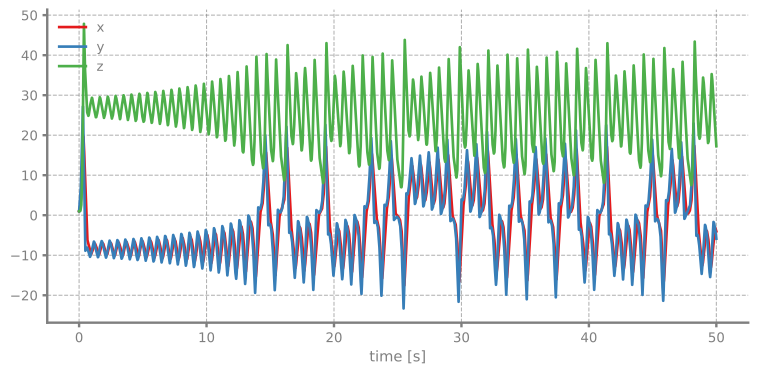
First, let’s look at how x, y, and z evolve over time. Notice the irregular, non-repeating patterns characteristic of chaos.
[6]:
sco.plot()
plt.show()
The Famous Butterfly Shape - 3D Attractor
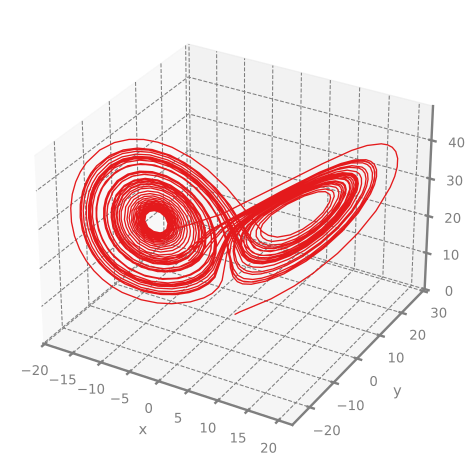
The true beauty of the Lorenz attractor emerges in 3D phase space. The trajectory traces out a distinctive “butterfly” or “owl face” shape with two lobes. The system orbits chaotically around two unstable fixed points.
[7]:
# Plot 3D attractor
sco.plot3D(lw=1)
plt.show()
2D Projections
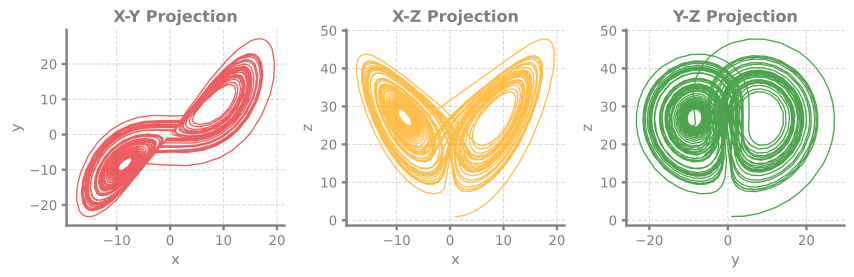
We can also view 2D projections of the attractor to see its structure from different angles.
[8]:
# Get trajectory data
time, [x, y, z] = sco.read()

# Create 2D projections
fig, axes = plt.subplots(1, 3, figsize=(9, 3), dpi=120)

# X-Y plane
axes[0].plot(x, y, linewidth=1, alpha=0.7)
axes[0].set_xlabel('x')
axes[0].set_ylabel('y')
axes[0].set_title('X-Y Projection')
axes[0].grid(True, alpha=0.3)

# X-Z plane
axes[1].plot(x, z, linewidth=1, alpha=0.7, color='orange')
axes[1].set_xlabel('x')
axes[1].set_ylabel('z')
axes[1].set_title('X-Z Projection')
axes[1].grid(True, alpha=0.3)

# Y-Z plane
axes[2].plot(y, z, linewidth=1, alpha=0.7, color='green')
axes[2].set_xlabel('y')
axes[2].set_ylabel('z')
axes[2].set_title('Y-Z Projection')
axes[2].grid(True, alpha=0.3)

plt.tight_layout()
plt.show()
[ ]: