RF Network - One Port
This is an example of a simulation of a Radio Frequency (RF) network with PathSim.
You can also find a similar example in the GitHub repository.
Let’s first make all the necessary import
[1]:
import matplotlib.pyplot as plt

# Apply PathSim docs matplotlib style for consistent, theme-friendly figures
plt.style.use('../pathsim_docs.mplstyle')

from pathsim import Simulation, Connection
from pathsim.blocks import Spectrum, GaussianPulseSource
from pathsim.solvers import RKBS32

from pathsim.blocks.rf import RFNetwork  # requires the scikit-rf package to be installed
The block RFNetwork takes as input either a Touchstone file (.sNp file) or a scikit-rf Network. An N-port network has N inputs and N outputs.
[2]:
# The RF-Network block is created from a scikit-rf Network object example.
# Here we use a frequency measurement example of a 1-port RF network (included in scikit-rf)
import skrf as rf  # for the example
rfntwk = RFNetwork(rf.data.ring_slot_meas)
Under the hood, scikit-rf performs a Vector Fitting of the frequency data and creates a PathSim State-Space model.
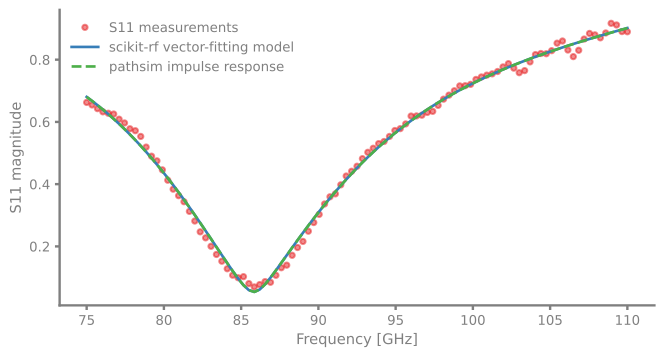
In the following, we use a gaussian pulse to simulate the impulse response of the RF block. A spectrum analyzer (Spectrum) is used to display the frequency response of the response. This frequency response is then compared to the original frequency data.
[3]:
# Gaussian pulse simulating an impulse response
# Note that the scikit-rf Network object is passed as the 'network' parameter of the block,
# which is convenient to access its frequency data.
src = GaussianPulseSource(f_max=rfntwk.network.frequency.stop)

# Spectrum analyser setup with the start and stop frequencies of the RF network
spc = Spectrum(
    freq=rfntwk.network.f,
    labels=["pulse", "response"]
)
[4]:
# create the system connections and simulation setup
sim = Simulation(
    blocks=[src, rfntwk, spc],
    connections=[
        Connection(src, rfntwk, spc[0]),
        Connection(rfntwk, spc[1])
    ],
    tolerance_lte_abs=1e-16, # this is due to the super tiny states
    tolerance_lte_rel=1e-5,  # so error control is dominated by the relative truncation error
    Solver=RKBS32,
)

sim.run(1e-9)
10:59:25 - INFO - LOGGING (log: True)
10:59:25 - INFO - BLOCKS (total: 3, dynamic: 2, static: 1, eventful: 0)
10:59:25 - INFO - GRAPH (nodes: 3, edges: 3, alg. depth: 2, loop depth: 0, runtime: 0.086ms)
10:59:25 - INFO - STARTING -> TRANSIENT (Duration: 0.00s)
10:59:26 - INFO - --------------------   1% | 0.0s<3.9s | 1982.9 it/s
10:59:26 - INFO - ####----------------  20% | 0.5s<1.2s | 1933.9 it/s
10:59:26 - INFO - ########------------  40% | 0.7s<0.2s | 1994.5 it/s
10:59:26 - INFO - ############--------  60% | 0.7s<0.1s | 1972.1 it/s
10:59:26 - INFO - ################----  80% | 0.8s<0.1s | 1797.4 it/s
10:59:26 - INFO - #################### 100% | 0.9s<--:-- | 1945.6 it/s
10:59:26 - INFO - FINISHED -> TRANSIENT (total steps: 1707, successful: 1661, runtime: 875.82 ms)
[4]:
{'total_steps': 1707, 'successful_steps': 1661, 'runtime_ms': 875.824521004688}
Below, we compare the PathSim’s frequency response to the original measurement data and to their Vector Fitted model calculated with scikit-rf. The Vector Fitted model and the PathSim’s frequency response are in perfect agreement:
[5]:
# model frequency response H(f) recovered from the spectrum block
freq, (G_pulse, G_filt) = spc.read()
H_filt_sim = G_filt / G_pulse

# plot the original S11 data, the vector-fitted model and the recovered frequency response
fig, ax = plt.subplots()
ax.plot(rfntwk.network.f/1e9, abs(rfntwk.network.s[:, 0, 0]), '.', label="S11 measurements", alpha=0.5)
ax.plot(freq/1e9, abs(rfntwk.vf.get_model_response(0, 0, freqs=freq)), lw=2, label="scikit-rf vector-fitting model")
ax.plot(freq/1e9, abs(H_filt_sim), '--', lw=2, label="pathsim impulse response")
ax.set_xlabel("Frequency [GHz]")
ax.set_ylabel("S11 magnitude")
ax.legend()
plt.show()