Algebraic Loop
You can also find this example as a single file in the GitHub repository.This example demonstrates PathSim’s ability to handle algebraic loops - situations where a signal feeds back on itself instantaneously without any dynamic element (integrator, delay, etc.) in the loop.
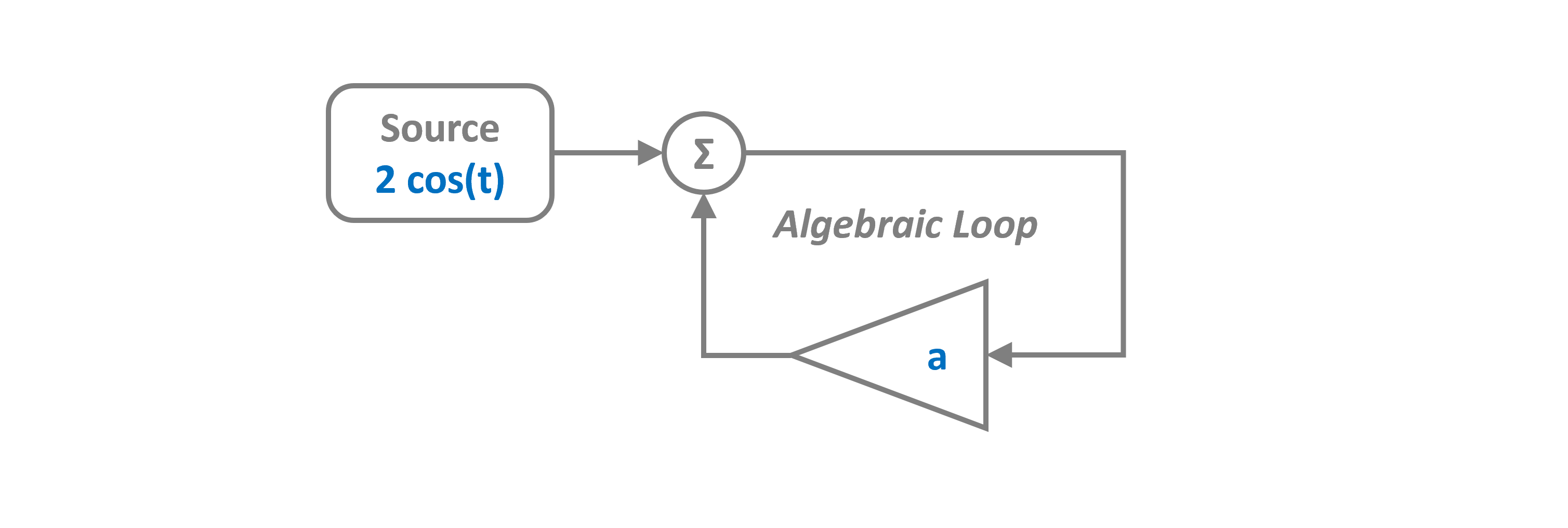
What is an Algebraic Loop?
An algebraic loop occurs when the output of a block depends on its own input in the same timestep. This creates an implicit equation that must be solved:
PathSim automatically detects algebraic loops and resolves them at each timestep using accelerated fixed-point iterations through wrapping looping connections with the ConnectionBooster class.
System Description
In this example:
A source generates a sinusoidal signal: \(s(t) = 2\cos(t)\)
An amplifier multiplies by gain \(a = -0.2\)
An adder sums the source and amplifier output
The amplifier input comes from the adder output, creating a loop
This creates the algebraic equation:
Which has the analytical solution:
PathSim automatically detects and solves algebraic loops using accelerated fixed-point iteration trough the ConnectionBooster class. Tolerances for the loop solver are configurable via the tolerance_fpi parameter.
[1]:
import numpy as np
import matplotlib.pyplot as plt

# Apply PathSim docs matplotlib style for consistent, theme-friendly figures
plt.style.use('../pathsim_docs.mplstyle')

from pathsim import Simulation, Connection
from pathsim.blocks import Source, Amplifier, Adder, Scope
System Parameters
We define:
Timestep: 0.1 s
Algebraic feedback gain: \(a = -0.2\)
[2]:
# Simulation timestep
dt = 0.1

# Algebraic feedback gain
a = -0.2
Block Diagram
[3]:
# Blocks that define the system
Src = Source(lambda t: 2*np.cos(t))
Amp = Amplifier(a)
Add = Adder()
Sco = Scope(labels=["src", "amp", "add"])

blocks = [Src, Amp, Add, Sco]
Connections
Notice that the output of the Add block connects to the input of Amp, and the output of Amp connects back to the second input of Add. This creates the algebraic loop.
[4]:
connections = [
    Connection(Src, Add),          # Source to adder input 0
    Connection(Add, Amp),          # Adder output to amplifier
    Connection(Amp, Add[1]),       # Amplifier back to adder input 1 (loop!)
    Connection(Src, Sco),          # Scopes for plotting
    Connection(Amp, Sco[1]),
    Connection(Add, Sco[2])
]
Simulation
PathSim automatically detects the algebraic loop and solves it using fixed-point iteration at each timestep. No special configuration is needed!
[5]:
# Initialize simulation with logging enabled
Sim = Simulation(blocks, connections, dt=dt, log=True)

# Run the simulation for 5 seconds
Sim.run(5)
12:11:18 - INFO - LOGGING (log: True)
12:11:18 - INFO - BLOCKS (total: 4, dynamic: 0, static: 4, eventful: 0)
12:11:18 - INFO - GRAPH (nodes: 4, edges: 6, alg. depth: 1, loop depth: 2, runtime: 0.092ms)
12:11:18 - INFO - STARTING -> TRANSIENT (Duration: 5.00s)
12:11:18 - INFO - --------------------   2% | 0.0s<0.0s | 1492.9 it/s
12:11:18 - INFO - ####----------------  21% | 0.0s<0.0s | 10252.3 it/s
12:11:18 - INFO - ########------------  40% | 0.0s<0.0s | 10278.7 it/s
12:11:18 - INFO - ############--------  60% | 0.0s<0.0s | 10354.4 it/s
12:11:18 - INFO - ################----  80% | 0.0s<0.0s | 10074.7 it/s
12:11:18 - INFO - #################### 100% | 0.0s<--:-- | 10814.2 it/s
12:11:18 - INFO - FINISHED -> TRANSIENT (total steps: 51, successful: 51, runtime: 8.28 ms)
[5]:
{'total_steps': 51, 'successful_steps': 51, 'runtime_ms': 8.280668000224978}
Results
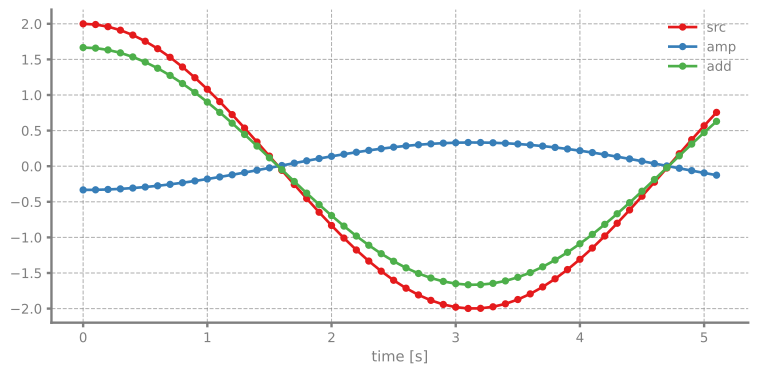
The plot shows:
src (blue): Input signal = \(2\cos(t)\)
amp (orange): Amplifier output = \(-0.2 \times \text{add}\)
add (green): Adder output = \(\frac{2\cos(t)}{1.2} \approx 1.667\cos(t)\)
The algebraic loop is solved correctly at each timestep!
[6]:
Sco.plot(".-")
plt.show()
Verification
Let’s verify the solution is correct by checking that the adder output matches the analytical solution.
[7]:
# Get simulation results
time, [src_sig, amp_sig, add_sig] = Sco.read()

# Analytical solution
analytical = 2*np.cos(time) / (1 - a)

# Plot comparison
fig, ax = plt.subplots(figsize=(8, 4), dpi=120)
ax.plot(time, add_sig, 'o-', label='Simulated', markersize=4)
ax.plot(time, analytical, '--', label='Analytical', linewidth=2)
ax.set_xlabel('Time [s]')
ax.set_ylabel('Amplitude')
ax.set_title('Algebraic Loop Solution Verification')
ax.legend()
ax.grid(True)
plt.show()

# Compute error
error = np.max(np.abs(add_sig - analytical))
print(f"Maximum error: {error:.2e}")
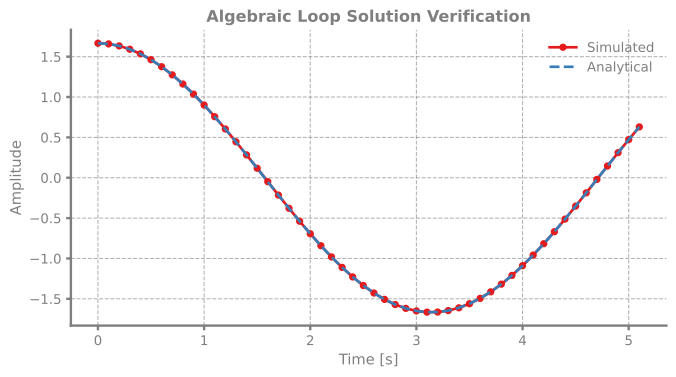
Maximum error: 2.22e-16