PID Controller
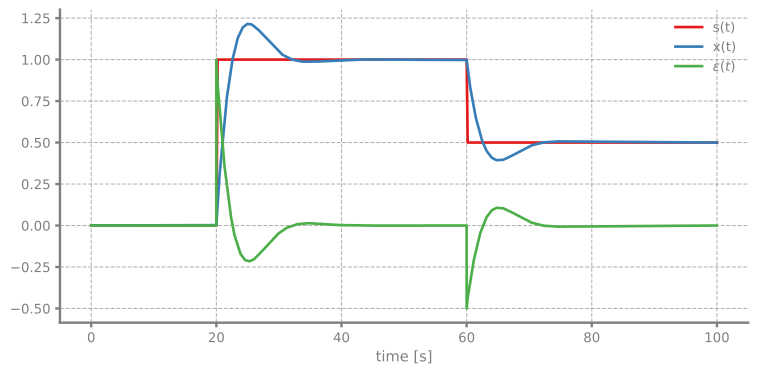
Simulation of a PID controller tracking a step-changing setpoint.
You can also find this example as a single file in the GitHub repository.
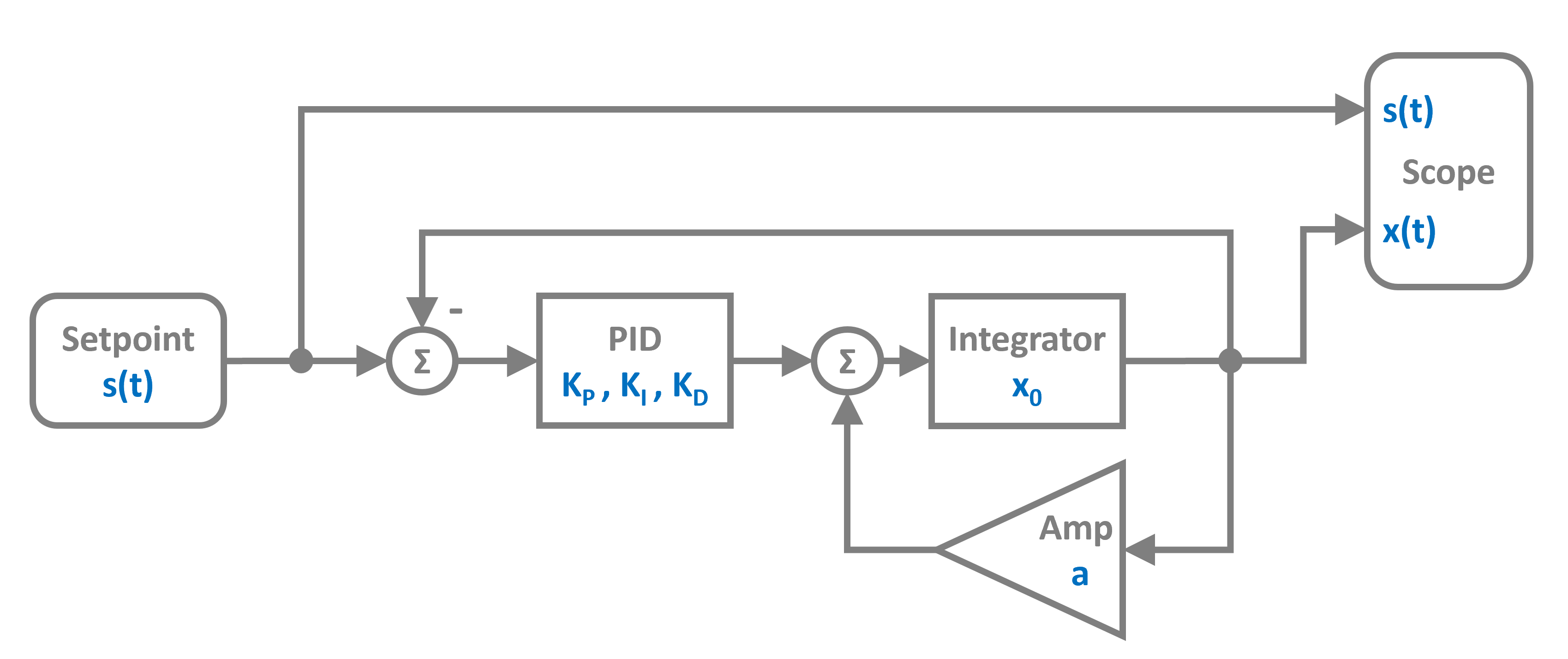
The control system uses a PID controller block that computes the control signal based on the error between setpoint and output. The plant is modeled as an Integrator with a gain. As a block diagram it looks like this:
Import and Setup
First let’s import the required classes and blocks:
[1]:
import numpy as np
import matplotlib.pyplot as plt

# Apply PathSim docs matplotlib style
plt.style.use('../pathsim_docs.mplstyle')

from pathsim import Simulation, Connection
from pathsim.blocks import Source, Integrator, Amplifier, Adder, Scope, PID
from pathsim.solvers import RKCK54
System Parameters
We define the plant gain and PID parameters.
[2]:
# Plant gain
K = 0.4

# PID parameters
Kp, Ki, Kd = 1.5, 0.5, 0.1

# Setpoint function - step changes at t=20s and t=60s
def f_s(t):
    if t > 60:
        return 0.5
    elif t > 20:
        return 1
    else:
        return 0
System Definition
Now we can construct the system by instantiating the blocks we need and collecting them in a list:
[3]:
# Blocks
spt = Source(f_s)
err = Adder("+-")  # Computes setpoint - output
pid = PID(Kp, Ki, Kd, f_max=10)  # PID with saturation
pnt = Integrator()
pgn = Amplifier(K)
sco = Scope(labels=["s(t)", "x(t)", r"$\epsilon(t)$"])

blocks = [spt, err, pid, pnt, pgn, sco]
The connections form a feedback control loop. The Adder block with signature "+-" computes the error signal by subtracting the plant output from the setpoint.
[4]:
connections = [
    Connection(spt, err, sco[0]),      # Setpoint to error and scope
    Connection(pgn, err[1], sco[1]),   # Output to error (negative) and scope
    Connection(err, pid, sco[2]),      # Error to PID and scope
    Connection(pid, pnt),              # PID output to plant
    Connection(pnt, pgn)               # Plant to gain
]
Simulation Setup and Execution
We initialize the simulation with the RKCK54 solver (Runge-Kutta Cash-Karp 5th order with adaptive step size).
[5]:
# Simulation initialization
Sim = Simulation(blocks, connections, Solver=RKCK54)

# Run the simulation for 100 seconds
Sim.run(100)
10:29:39 - INFO - LOGGING (log: True)
10:29:39 - INFO - BLOCKS (total: 6, dynamic: 2, static: 4, eventful: 0)
10:29:39 - INFO - GRAPH (nodes: 6, edges: 8, alg. depth: 4, loop depth: 0, runtime: 0.095ms)
10:29:39 - INFO - STARTING -> TRANSIENT (Duration: 100.00s)
10:29:39 - INFO - --------------------   1% | 0.0s<0.1s | 1754.2 it/s
10:29:39 - INFO - ####----------------  20% | 0.0s<97:22:10 | 3338.8 it/s
10:29:39 - INFO - ########------------  40% | 0.1s<0.1s | 3313.7 it/s
10:29:39 - INFO - ############--------  60% | 0.1s<22:34:33 | 3378.1 it/s
10:29:39 - INFO - ################----  80% | 0.1s<0.0s | 3381.9 it/s
10:29:39 - INFO - #################### 100% | 0.1s<--:-- | 3354.0 it/s
10:29:39 - INFO - FINISHED -> TRANSIENT (total steps: 455, successful: 291, runtime: 141.64 ms)
[5]:
{'total_steps': 455, 'successful_steps': 291, 'runtime_ms': 141.63785800064943}
Results
Let’s plot the setpoint, output, and error signals to see how well the PID controller tracks the setpoint:
[6]:
sco.plot()
plt.show()