Switched Bouncing Ball
This example demonstrates advanced event handling with multiple simultaneous events, event switching, and conditional event logic. The bouncing ball bounces on a table first, and then drops to the floor and continues to bounce there.
You can also find this example as a single file in the GitHub repository.
This example showcases:
Multiple
ZeroCrossingevents tracking different conditionsConditionevents for conditional logic (count-based switching)Dynamic event activation/deactivation using
on()/off()methodsNonlinear friction forces modeled with the
Functionblock
First let’s import the Simulation and Connection classes along with the required blocks and event managers:
[1]:
import numpy as np
import matplotlib.pyplot as plt

# Apply PathSim docs matplotlib style
plt.style.use('../pathsim_docs.mplstyle')

from pathsim import Simulation, Connection
from pathsim.blocks import Integrator, Constant, Function, Adder, Scope
from pathsim.solvers import RKBS32
from pathsim.events import ZeroCrossing, Condition
System Dynamics
The ball experiences:
Gravitational acceleration downward
Quadratic air resistance (Newton’s drag law)
Elastic bounces at \(x = 0\) (floor) and \(x = -5\) (ceiling)
The equation of motion is:
where \(k\) is the mass-normalized friction coefficient.
[2]:
# Simulation timestep
dt = 0.01

# Gravitational acceleration
g = 9.81

# Elasticity of bounce
b = 0.95

# Mass normalized friction coefficient
k = 0.2

# Initial values
x0, v0 = 1, 10
Block Diagram Construction
[3]:
# Newton friction (quadratic drag)
def fric(v):
    return -k * np.sign(v) * v**2

# Blocks that define the system
Ix = Integrator(x0)     # v -> x
Iv = Integrator(v0)     # a -> v
Fr = Function(fric)     # newton friction
Ad = Adder()
Cn = Constant(-g)       # gravitational acceleration
Sc = Scope(labels=["x", "v"])

blocks = [Ix, Iv, Fr, Ad, Cn, Sc]

# The connections between the blocks
connections = [
    Connection(Cn, Ad[0]),
    Connection(Fr, Ad[1]),
    Connection(Ad, Iv),
    Connection(Iv, Ix, Fr),
    Connection(Ix, Sc[0])
]
Event Managers
We define three events:
E1: Table bounce at $x = 0$ (
ZeroCrossing)E2: Floor bounce at $x = -5$ (
ZeroCrossing)E3: Conditional switch after 10 floor bounces (
Condition)
[4]:
# Event 1: Table bounce (x = 0)
def func_evt_1(t):
    *_, x = Ix()
    return x

def func_act_1(t):
    *_, x = Ix()
    *_, v = Iv()
    Ix.engine.set(abs(x))
    Iv.engine.set(-b*v)

E1 = ZeroCrossing(
    func_evt=func_evt_1,
    func_act=func_act_1,
    tolerance=1e-4
)
[5]:
# Event 2: Floor bounce (x = -5)
def func_evt_2(t):
    *_, x = Ix()
    return x + 5

def func_act_2(t):
    *_, x = Ix()
    *_, v = Iv()
    Ix.engine.set(abs(x + 5) - 5)
    Iv.engine.set(-b*v)

E2 = ZeroCrossing(
    func_evt=func_evt_2,
    func_act=func_act_2,
    tolerance=1e-4
)
The third event uses the Condition event type, which triggers based on a boolean condition rather than a zero crossing. Here it counts table bounces and disables detection after 10 occurrences:
[6]:
# Event 3: Conditional switch after 10 table bounces
E3 = Condition(
    func_evt=lambda *_: len(E1) >= 10,        # number of events 'E1' (bounces)
    func_act=lambda *_: [E1.off(), E3.off()]  # callback switches event tracking
)
The condition event checks if the table bounce event E1 has occurred 10 times. When this happens, it:
Disables table bounce tracking with
E1.off()Disables itself with
E3.off()
After this point, only the flfoor bounce E2 remains active.
We initialize the simulation with the adaptive timestep RKBS32 solver (Runge-Kutta-Bogacki-Shampine 3(2) method) to enable backtracking for the event system to resolve event locations in time:
[7]:
# Initialize simulation
Sim = Simulation(
    blocks,
    connections,
    events=[E1, E2, E3],
    dt=dt,
    log=True,
    Solver=RKBS32,
    tolerance_lte_abs=1e-6,
    tolerance_lte_rel=1e-4
)
14:49:01 - INFO - LOGGING (log: True)
14:49:01 - INFO - BLOCKS (total: 6, dynamic: 2, static: 4, eventful: 0)
14:49:01 - INFO - GRAPH (nodes: 6, edges: 6, alg. depth: 3, loop depth: 0, runtime: 0.045ms)
Now let’s run the simulation:
[8]:
# Run the simulation
Sim.run(15)
14:49:01 - INFO - STARTING -> TRANSIENT (Duration: 15.00s)
14:49:01 - INFO - --------------------   1% | 0.0s<0.1s | 3892.4 it/s
14:49:01 - INFO - ####----------------  20% | 0.0s<0.1s | 5466.6 it/s
14:49:01 - INFO - ########------------  40% | 0.1s<0.1s | 5423.6 it/s
14:49:01 - INFO - ############--------  60% | 0.1s<0.0s | 5609.9 it/s
14:49:01 - INFO - ################----  80% | 0.1s<0.0s | 5588.7 it/s
14:49:01 - INFO - #################### 100% | 0.2s<--:-- | 5636.0 it/s
14:49:01 - INFO - FINISHED -> TRANSIENT (total steps: 862, successful: 595, runtime: 165.81 ms)
[8]:
{'total_steps': 862, 'successful_steps': 595, 'runtime_ms': 165.8144489992992}
Results
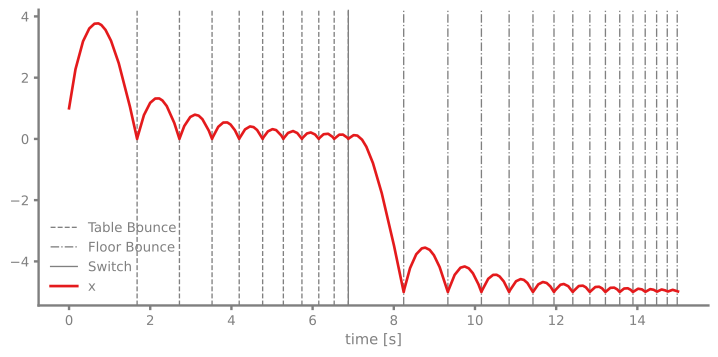
Let’s plot the results with all three event types marked differently:
[9]:
# Plot the recordings from the scope
time, [data_x] = Sc.read()
fig, ax = plt.subplots(figsize=(9, 4), dpi=130)
for t in E1:
    ax.axvline(t, ls="--", lw=1, c="gray", label="Table Bounce" if t == list(E1)[0] else None)
for t in E2:
    ax.axvline(t, ls="-.", lw=1, c="gray", label="Floor Bounce" if t == list(E2)[0] else None)
for t in E3:
    ax.axvline(t, ls="-", lw=1, c="gray", label="Switch")
ax.plot(time, data_x, label="x")
ax.set_xlabel("time [s]")
ax.legend()
plt.show()
ax.legend()
plt.show()
Analysis
The plot reveals several interesting behaviors:
Initial phase: The ball bounces on the table floor (\(x = 0\), dashed lines)
Switch event: After 10 table bounces, the conditional event triggers (solid vertical line)
Post-switch phase: Table bounces are no longer detected, so the ball passes through the table and falls to the floor where it continues to bounce
Energy dissipation: Due to air resistance, the amplitude decreases over time
This demonstrates how event logic can dynamically change system behavior during simulation, useful for:
Mode switching in control systems
Modeling wear or failure after a certain number of cycles
Implementing complex state machines
Event Counts
We can also check how many times each event occurred:
[10]:
print(f"Table bounces (E1): {len(E1)}")
print(f"Floor bounces (E2): {len(E2)}")
print(f"Switch events (E3): {len(E3)}")
Table bounces (E1): 10
Floor bounces (E2): 15
Switch events (E3): 1
As expected, E1 should have exactly 10 events (the trigger condition), E3 should have 1 event (when it disabled itself), and E2 will vary depending on the system dynamics.